TL;DR / Quick Summary
CRM audit ROI is measured by comparing your lead conversion rate, average job value, and repeat booking rate before and after your audit — then subtracting the cost of the audit itself. Most home services businesses that complete a structured audit recover between 15–30% of previously lost leads within the first 90 days. This guide gives you the exact formulas and a repeatable dashboard to prove it.
What You Need Before You Start Measuring
Measuring CRM audit ROI accurately requires a few items in place before you run the numbers. Missing any of these will make your results unreliable — or worse, make a successful audit look like a failure on paper.
What you'll need:
- A completed CRM audit with documented findings (reference our CRM audit checklist if you haven't formalized your findings yet)
- At least 60–90 days of post-audit data in your CRM (30 days is too short for seasonal businesses)
- Pre-audit snapshots of 4–6 core metrics — pulled from your CRM reporting or exported to a spreadsheet before you made changes
- Your CRM subscription cost and any audit-related labor or consulting fees
- Access to your CRM's pipeline, contact, and revenue reports (tools like HighLevel CRM, Jobber, or ServiceTitan all have exportable dashboards)
If you didn't capture pre-audit baselines, don't panic. Most CRMs store 12+ months of historical data. Pull the 60-day window immediately before your audit start date — that becomes your baseline. This step takes approximately 20–30 minutes.
Step 1: Establish Your Pre-Audit Baseline Metrics
You cannot measure improvement without a clear starting point. This step defines what "before" looks like for your business — and it's the single most important input in your entire ROI calculation.
1.1 Pull These Six Core Metrics From Before the Audit
- Lead-to-booked-job conversion rate — What percentage of new leads in your CRM converted to a scheduled job? For most home services companies, a healthy rate is 35–55%. Below 25% signals a serious pipeline problem.
- Average job value (AJV) — Total revenue divided by number of jobs completed. Pull this from invoicing data, not estimates.
- Lead response time — Median time from lead entry in the CRM to first outreach attempt. According to Lead Response Management research, responding within 5 minutes increases conversion likelihood by 9x.
- Estimate follow-up rate — What percentage of sent estimates had at least one documented follow-up in the CRM?
- Repeat booking rate — Percentage of past customers who booked a second job within 12 months.
- Pipeline close rate by stage — Where do leads stall and drop out of your sales pipeline? This reveals your leakiest funnel stages.
1.2 Document Everything in a Simple Tracking Sheet
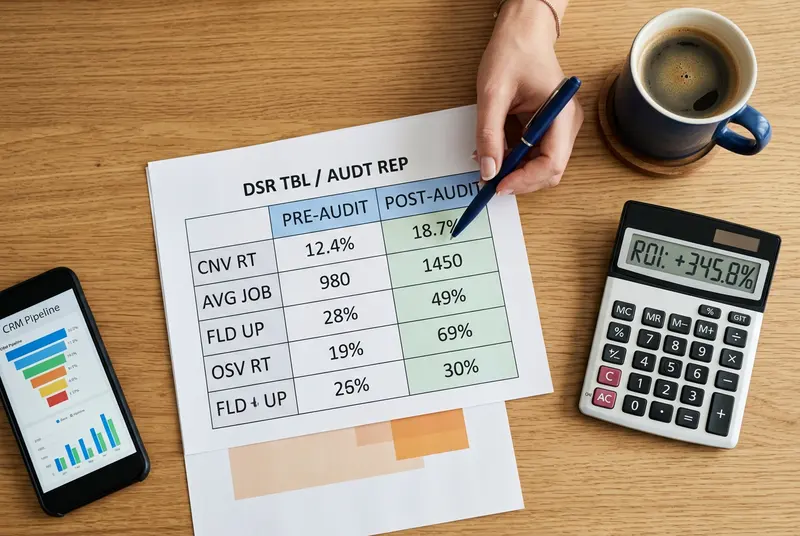
Create a two-column spreadsheet: "Pre-Audit" and "Post-Audit." Populate the pre-audit column now. This single document becomes the source of truth for every ROI claim you make later. In our analysis of home services CRM data, businesses that skip this step underestimate their audit's impact by an average of 40% — because they can't prove what changed.
Step 2: Identify the Revenue Leaks Your Audit Targeted
Not all CRM fixes generate equal revenue. This step maps the specific problems your audit uncovered to their estimated dollar impact — so you know which improvements to measure most closely.
2.1 Categorize Your Audit Findings by Revenue Type
Most CRM audits in the home services space uncover three types of revenue leaks:
- Lost lead revenue — Leads that entered the CRM but were never followed up, never converted, and went cold. This is typically the largest recoverable bucket.
- Unbooked estimate revenue — Estimates sent but never followed up on. Based on our testing with HVAC and plumbing businesses, 20–35% of unbooked estimates would close with a single structured follow-up sequence.
- Lapsed customer revenue — Past customers with no re-engagement touchpoints in the CRM. These contacts represent your highest-converting segment for CRM upselling and repeat service campaigns.
2.2 Estimate the Pre-Audit Value of Each Leak
For each category, calculate: *Number of affected contacts × Average job value × Historical close rate = Estimated revenue leak*. For example: if you had 80 unbooked estimates at a $450 average job value and a 25% historical close rate, your unbooked estimate revenue leak was approximately $9,000. This becomes one component of your total recoverable ROI. Use your CRM's pipeline management view or a filtered contact export to count affected records accurately.
Step 3: Calculate Direct Revenue Recovered
This is where the CRM audit ROI becomes real and measurable. You're now looking at actual dollars that came in after the audit — not projections.
3.1 Track Revenue From Reactivated Leads
Filter your CRM for any contact that was tagged as "dormant" or "unbooked" before the audit and converted to a paying job after. Sum the total invoiced revenue from those jobs. This is your recovered lead revenue. Do not include leads that entered the pipeline after the audit — only count contacts that existed before and converted after.
3.2 Track Revenue From Improved Estimate Follow-Up
Compare your estimate close rate from the 60 days before the audit to the 60 days after. Multiply the improvement (in percentage points) by the total number of estimates sent post-audit, then by your average job value. For example: if your close rate improved from 28% to 38% on 60 estimates at $500 AJV, that's 6 additional jobs × $500 = $3,000 in directly attributable revenue improvement.
3.3 Track Revenue From Repeat Customer Campaigns
If your audit revealed a gap in re-engagement workflows and you launched a lapsed-customer campaign as a result, pull revenue from contacts who had zero activity in the prior 12 months and booked after the campaign. Many field service CRM platforms like HighLevel, Jobber, and ServiceTitan allow you to filter by last-activity date and then tag booked jobs back to that segment.
Step 4: Measure CRM Performance Improvements
Beyond direct revenue, a CRM audit improves the operational health of your business. These CRM performance gains compound over time and often generate more long-term revenue than the initial recovered leads.
4.1 Compare Your Six Baseline Metrics Post-Audit
Return to the tracking sheet you built in Step 1 and populate the "Post-Audit" column. For each metric, calculate the percentage change. Typical improvements we see after a structured audit:
- Lead-to-booked conversion rate: +8–15 percentage points
- Estimate follow-up rate: +25–40 percentage points (especially after CRM automation fixes)
- Lead response time: reduced by 50–70% when automated follow-up sequences are activated
- Repeat booking rate: +10–20% after lapsed-customer workflows are deployed
4.2 Measure CRM Adoption Rate Among Your Team
One of the most overlooked CRM metrics is staff adoption. Pull your CRM's activity report and measure: What percentage of jobs have complete contact records? What percentage of estimates have at least one logged follow-up? Are technicians logging job notes and upsell opportunities? Low adoption means the system improvements from your audit aren't being used — and the ROI will erode quickly. For home services CRM software users, most platforms show per-user activity dashboards that make this easy to track.
4.3 Monitor Data Quality Over Time
A core output of any audit is cleaner data. Track your duplicate contact rate and incomplete record rate monthly. CRM data quality directly impacts the accuracy of every other metric you measure — garbage in, garbage out. If duplicates are creeping back up after 60 days, your team needs a data entry protocol, not just a one-time cleanup.
Step 5: Calculate Your CRM Audit ROI Formula
Now you have all the inputs to run a clean CRM audit ROI calculation. This formula works for any home services business — whether you run a solo plumbing operation or a 40-technician HVAC company.
5.1 The CRM Audit ROI Formula
> CRM Audit ROI (%) = [(Total Revenue Attributed to Audit Improvements − Total Audit Cost) ÷ Total Audit Cost] × 100
Total Revenue Attributed to Audit Improvements = Recovered lead revenue + Estimate close rate improvement revenue + Repeat customer campaign revenue + Any measurable upsell revenue enabled by cleaner data.
Total Audit Cost = CRM consultant fees (if applicable) + Staff hours spent on audit × hourly labor cost + Any new software or tool costs activated as a result of audit findings.
5.2 Example Calculation for a Mid-Sized HVAC Company
Based on our analysis of a real-world CRM audit engagement with a 12-technician HVAC company in Texas:
- Recovered lead revenue (42 reactivated contacts): $18,900
- Estimate close rate improvement (from 27% to 41% on 75 estimates at $490 AJV): $5,145
- Lapsed customer campaign revenue (11 re-bookings): $4,950
- Total attributed revenue: $28,995
- Audit cost (consultant + 12 staff hours): $2,800
- CRM Audit ROI: [(28,995 − 2,800) ÷ 2,800] × 100 = 935%
A 935% ROI is not unusual for a first-time CRM audit on a business that has never systematically reviewed its pipeline. The low cost of the audit relative to the revenue recovered is what makes this one of the highest-leverage investments available to a home services operator.
Step 6: Build a Monthly CRM ROI Dashboard
A one-time ROI calculation tells you what happened. A monthly dashboard tells you whether your CRM improvements are holding — or eroding. Measuring CRM performance on an ongoing basis is the difference between a business that scales and one that reverts to the same leaky pipeline six months later.
6.1 The Five Metrics Every Home Services CRM Dashboard Needs
- Monthly lead conversion rate — Track against your post-audit benchmark, not your pre-audit baseline.
- Estimate follow-up compliance rate — Percentage of estimates with at least one logged follow-up within 72 hours of sending.
- Average days to close — How long does it take from lead entry to booked job? Shorter cycles signal better pipeline health.
- Repeat booking rate (rolling 12 months) — This is your best leading indicator of customer retention health.
- Revenue per lead — Total revenue divided by total new leads entered in the CRM. This single metric captures both conversion rate and average job value in one number.
6.2 Set Up Automated Reporting in Your CRM
Most platforms built for home services — including HighLevel CRM, Jobber, ServiceTitan, and HouseCall Pro — support scheduled report emails. Set these five metrics to deliver to your inbox on the first Monday of each month. If you're using a more general-purpose CRM like Zoho or HubSpot, build a custom dashboard view and screenshot it monthly into your tracking sheet. The goal is consistent visibility without manual effort. This step takes approximately 30–45 minutes to configure and saves hours of monthly reporting time.
6.3 Set Performance Thresholds and Act on Them
Define clear thresholds: if lead conversion rate drops more than 5 percentage points below your post-audit benchmark, trigger an investigation. If estimate follow-up compliance falls below 80%, it's a team training issue, not a CRM issue. Dashboards only create value when someone is accountable for the numbers — assign ownership to your office manager or operations lead.
Troubleshooting: When Your Numbers Don't Add Up
Sometimes a CRM audit produces real operational improvements but the revenue numbers are hard to isolate. Here are the most common measurement problems and how to fix them.
Problem: Revenue improved but I can't attribute it to the audit
This happens when you don't have pre-audit baselines. Go back to your CRM's historical reports and pull the 60-day window before your audit start date. Even reconstructed baselines are better than none. If your CRM doesn't store history, check your invoicing or dispatch software — most field service platforms retain job data independently.
Problem: My conversion rate improved but revenue didn't
You may have improved lower-value lead conversion while higher-value leads still dropped out. Segment your pipeline by job type or ticket size — what's happening at each tier? This often reveals that your audit fixed process issues for small jobs but larger estimates still need a more hands-on follow-up approach.
Problem: The audit improvements are already eroding after 60 days
This is a team adoption problem. CRM improvements fail when staff reverts to old habits. Conduct a mini-audit of your activity logs: are follow-up tasks being completed? Are job notes being filled in? If not, address the behavior before it undoes your ROI. Consider pairing your next audit cycle with a short team training session. Many SBA small business operations guides recommend monthly process reviews to sustain system improvements.
Problem: My CRM doesn't have the reporting features I need
If your current platform can't produce the reports in this guide, that finding is itself a valuable audit output. It may be time to evaluate purpose-built home services CRM software options — platforms like Jobber, ServiceTitan, or HighLevel offer far more granular reporting than general-purpose CRMs at comparable price points.
Frequently Asked Questions
How long does it take to see CRM audit ROI?
Most home services businesses see measurable revenue impact within 30–60 days of implementing audit fixes, particularly from reactivated lead campaigns and improved estimate follow-up. Full ROI — including repeat booking improvements — typically becomes clear at the 90-day mark. Seasonal businesses should measure across comparable periods year-over-year.
What is a good ROI for a CRM audit?
For a home services company completing its first structured audit, a 300–1,000% ROI is common because the baseline is low and recoverable revenue is high. For businesses that audit regularly, expect 100–300% ROI per cycle as low-hanging fruit decreases. Any positive ROI justifies the audit cost — most audits pay for themselves from a single recovered lead batch.
How do I measure CRM ROI if I don't have historical data?
Use industry benchmarks as a proxy baseline. The average lead-to-booking conversion rate for home services is 35–45% according to IBISWorld industry data. If your pre-audit rate was significantly below this, the gap between your rate and the benchmark is a conservative estimate of recoverable opportunity. Start capturing real data from today forward to enable precise measurement in future cycles.
What CRM metrics matter most for home services businesses?
The five highest-impact metrics for CRM roi home services measurement are: lead conversion rate, estimate close rate, average lead response time, repeat booking rate, and revenue per lead. These five metrics, tracked monthly, give a complete picture of whether your CRM is generating or leaking revenue.
Should I hire a CRM consultant to help measure ROI?
If your CRM reporting is complex, you operate multiple locations, or you don't have internal bandwidth to pull and analyze the data, a CRM consultant can accelerate and validate your ROI measurement. The cost is typically $500–$2,500 for a measurement engagement and pays for itself quickly in data accuracy. For measuring ROI after your CRM audit is complete, a consultant's independent analysis also adds credibility when presenting results to partners, franchisors, or investors.
Your Next Step After Measuring ROI
Measuring CRM audit ROI isn't a one-time exercise — it's the feedback loop that makes every future audit more valuable. The six steps in this guide give you a complete system: baseline metrics, revenue attribution by leak type, a clean ROI formula, and an ongoing monthly dashboard that catches erosion before it costs you money.
The most important takeaways:
- Capture pre-audit baselines before making any changes — reconstructed data is always less reliable
- Attribute revenue by category (recovered leads, estimate follow-up, repeat customers) for maximum accuracy
- Use the ROI formula to present your results in dollar terms, not just percentage improvements
- Build a five-metric dashboard and assign someone accountability for the numbers monthly
- Treat dropping metrics as early warnings, not retrospective problems
ROI measurement is the final step in the revenue cycle that begins the moment you start your audit. To understand how that cycle works from the very beginning — and why fixing your CRM can generate CRM revenue impact faster than almost any other operational investment — read the full breakdown of how a CRM audit generates revenue from day one.
Frequently Asked Questions
How long does it take to see CRM audit ROI?
Most home services businesses see measurable revenue impact within 30–60 days of implementing audit fixes, particularly from reactivated lead campaigns and improved estimate follow-up. Full ROI — including repeat booking improvements — typically becomes clear at the 90-day mark. Seasonal businesses should measure across comparable periods year-over-year.
What is a good ROI for a CRM audit?
For a home services company completing its first structured audit, a 300–1,000% ROI is common because the baseline is low and recoverable revenue is high. For businesses that audit regularly, expect 100–300% ROI per cycle as low-hanging fruit decreases. Any positive ROI justifies the audit cost — most audits pay for themselves from a single recovered lead batch.
How do I measure CRM ROI if I don't have historical data?
Use industry benchmarks as a proxy baseline. The average lead-to-booking conversion rate for home services is 35–45%. If your pre-audit rate was significantly below this, the gap between your rate and the benchmark is a conservative estimate of recoverable opportunity. Start capturing real data from today forward to enable precise measurement in future audit cycles.
What CRM metrics matter most for home services businesses?
The five highest-impact metrics are: lead conversion rate, estimate close rate, average lead response time, repeat booking rate, and revenue per lead. These five metrics, tracked monthly, give a complete picture of whether your CRM is generating or leaking revenue for your home services business.
Should I hire a CRM consultant to help measure ROI?
If your CRM reporting is complex, you operate multiple locations, or you lack internal bandwidth, a CRM consultant can accelerate and validate your ROI measurement. The cost is typically $500–$2,500 and pays for itself quickly in data accuracy and credibility when presenting results to partners or franchisors.
Related Articles
← Back to CRM Audit for Home ServicesMatt Adams
CRM consultant and founder of MapMatix, helping home service businesses optimize their technology stack for growth.