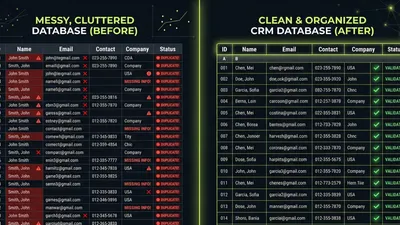
Your CRM is supposed to make selling easier. But what happens when it becomes the thing slowing you down?
According to CRM.org research, less than 40% of companies fully implement their CRM systems. That means most businesses are paying for tools they’re not using—or worse, tools that are actively working against them. If you’re still figuring out how to choose the right CRM for your business, knowing when to walk away from the wrong one is just as important.
The sunk cost fallacy keeps businesses stuck with bad CRMs for years. You’ve invested time, money, and training—so switching feels like admitting defeat. But staying with a broken system costs more than starting fresh.
Here are five red flags that signal it’s time to switch.
Already seeing these signs? Request a free CRM health check →
Red Flag #1: Your Team Avoids Using It
 Frustrated sales professional disengaged from CRM software at their desk — The most expensive CRM is one nobody uses
The most expensive CRM is one nobody uses.
If your sales team tracks deals in spreadsheets, stores contacts in their email, or keeps notes on paper, your CRM has already failed. It doesn’t matter how many features it has—if people work around it instead of through it, you’re getting zero return on your investment.
Warning Signs
- Reps log activities days or weeks late (if at all)
- Pipeline meetings rely on verbal updates, not CRM data
- New hires struggle to find customer history
- Managers can’t trust the numbers in reports
- “I’ll update it later” has become a running joke
Why This Happens
Poor adoption usually isn’t laziness—it’s a usability problem. According to Demandsage, sales teams spend only 18% of their time actually using CRM applications. The rest goes to selling, admin work, and—critically—working around clunky tools.
When a CRM requires too many clicks, doesn’t match your sales process, or feels like extra work rather than helpful support, people find shortcuts. Those shortcuts mean your CRM becomes a graveyard of outdated information.
The Real Cost
Companies with CRM adoption rates under 75% have measurably less effective sales teams. Meanwhile, top-performing sales organizations are 81% more likely to use their CRM consistently than underperforming teams.
If your team avoids your CRM, you’re not just losing data—you’re losing deals.
Red Flag #2: Your Data Is a Mess
Duplicate contacts. Missing fields. Outdated information. If pulling a clean customer list feels like archaeology, your CRM isn’t serving you—it’s sabotaging you.
Warning Signs
- The same customer appears multiple times with different information
- Reps waste time figuring out which record is correct
- Email campaigns bounce because contact data is stale
- Reports show impossible numbers (more deals than contacts, negative values)
- Nobody trusts the data enough to make decisions from it
Why This Happens
Bad data compounds. According to Validity’s State of CRM Data Management report, the average CRM is less than 80% accurate. If a sales rep touches 150 records per day and only 80% are accurate, they work with 30 bad records daily—wasting roughly 2.5 hours on inaccurate information.
The problem gets worse over time. Without proper duplicate detection, data validation, or cleanup processes, your CRM accumulates garbage. And garbage data leads to garbage decisions.
The Real Cost
 Disorganized paperwork and scattered documents representing poor CRM data quality — 44% of companies lose over 10% of revenue due to poor CRM data
Validity’s research found that 44% of companies estimate they lose over 10% of annual revenue due to poor CRM data quality—through lost customers, blown deals, and delayed initiatives.
That’s not a typo. Businesses are losing a tenth of their revenue because their CRM data can’t be trusted.
Struggling with messy data? Let’s talk about a cleanup strategy →
Red Flag #3: Key Integrations Don’t Work
Your CRM should connect your tools, not isolate them. If you’re manually copying data between systems, exporting and importing spreadsheets, or maintaining separate databases, your CRM has become a bottleneck instead of a hub.
Warning Signs
- You manually transfer data from forms to your CRM
- Invoicing and CRM show different customer information
- Marketing can’t see what sales is doing (and vice versa)
- Reports require pulling data from multiple systems
- “The integration broke again” is a regular occurrence
Why This Happens
According to Freshworks research, 17% of companies cite lack of integration as a major CRM challenge. And as businesses add more tools—marketing automation, accounting software, support desks, scheduling apps—the integration burden grows.
Some CRMs promise integrations that barely work. Syncs fail silently. Data transfers are one-way. Updates lag by hours or days. What looked good in a demo becomes a maintenance nightmare in practice.
The Real Cost
Integration failures mean duplicate work. Your team enters the same information in multiple places, increasing errors and wasting time that should go toward selling.
Worse, disconnected systems create blind spots. Marketing doesn’t know which leads converted. Sales doesn’t see support tickets. Everyone makes decisions with incomplete information.
Over 60% of HubSpot and Salesforce users now depend on third-party integrations. If those integrations don’t work reliably, the entire system falls apart.
 Professional manually copying data between multiple computer screens due to integration failures — Integration failures mean duplicate work and disconnected systems
Red Flag #4: Reports Don’t Reflect Reality
Your CRM should tell you what’s actually happening in your business. If reports consistently contradict what you see on the ground, you have a serious problem.
Warning Signs
- Pipeline totals change dramatically when you dig into the details
- Forecasts are routinely wrong by 30% or more
- The same report shows different numbers depending on who runs it
- “The data must be wrong” is a common response to dashboards
- You build separate spreadsheets to track what really matters
Why This Happens
Reports are only as good as the data and configuration behind them. If deals aren’t properly tagged, stages aren’t accurately updated, or custom fields aren’t consistently used, your reports become fiction.
Sometimes the problem is the CRM itself. Reporting limitations force you to make assumptions or exclude important data. Custom reports require technical expertise you don’t have in-house.
The Real Cost
Bad reporting leads to bad decisions. You hire based on projections that don’t materialize. You invest in products that don’t have the demand you thought. You miss warning signs until it’s too late.
According to Resco research, 74% of businesses say CRM technology gives them greater access to customer data. But access to wrong data is worse than no access at all—it creates false confidence.
When leadership stops trusting CRM reports, they start relying on gut instinct. That might work for a while, but it doesn’t scale.
Red Flag #5: You’ve Outgrown It
The CRM that worked when you were 5 people might not work at 50. The system that handled 100 leads per month might buckle under 1,000. Growth exposes limitations that weren’t visible before.
Warning Signs
- The system runs noticeably slower than it used to
- You’ve hit user limits, storage limits, or feature limits
- Critical features require expensive tier upgrades
- Workarounds have become standard operating procedure
- Your needs have changed but the CRM hasn’t kept up
Why This Happens
Entry-level CRMs are designed to get you started, not to scale with you. They deliberately limit features to push upgrades. They assume simple processes that no longer match your reality.
Sometimes you’ve just evolved. You started with basic contact management and now need complex workflows, multiple pipelines, territory management, or advanced automation. Your CRM was never built for what you’ve become.
The Real Cost
Outgrowing your CRM creates friction at every level. Reps fight the tool instead of using it. Managers piece together information from multiple sources. Leadership makes decisions without complete visibility.
The typical response is building workarounds—spreadsheets, manual processes, third-party tools bolted on top. Each workaround adds complexity and fragility. Eventually, you’re maintaining a Frankenstein system that nobody fully understands.
Ready to upgrade to a CRM that scales? Let’s find the right fit →
How to Know It’s Time to Switch
 Business professional thoughtfully contemplating CRM switching decision — Ask yourself: Would I choose this CRM today?
Seeing one red flag might be fixable. Seeing three or more? That’s a system problem, not a configuration problem.
Ask yourself:
- Would I choose this CRM today? If you knew what you know now, would you make the same decision?
- Is fixing it easier than switching? Some problems require starting fresh.
- What’s the cost of staying? Lost productivity, lost deals, lost data—add it up.
- Do I have the resources to fix it properly? If not, fixes become patches that create new problems.
The Switching Calculation
Switching CRMs is disruptive. Don’t underestimate the effort involved. But also don’t underestimate the cost of staying with a broken system.
A rough calculation: If your CRM is costing you 10% of revenue through lost deals and wasted productivity (which Validity’s research suggests is common), and switching would cost 1-2% of revenue in migration and training, the math is clear.
The best time to switch was before these problems got this bad. The second-best time is now.
Key Takeaways
- Low user adoption is the biggest red flag—a CRM nobody uses has negative ROI
- Messy data costs an estimated 10%+ of annual revenue for many businesses
- Integration failures turn your CRM from a hub into a silo
- Unreliable reports lead to bad decisions based on false confidence
- Outgrowing your CRM creates compounding workarounds that become unmaintainable
- If you wouldn’t choose your current CRM today, it’s probably time to switch
What to Do Next
If you recognized your situation in three or more of these red flags, you have a decision to make. You can keep fighting your current system, invest heavily in fixing it, or start fresh with something better.
Before you decide:
- Document the real costs — Track time wasted, deals lost, and workarounds required
- Assess your actual needs — What do you need today vs. what you needed when you started?
- Evaluate alternatives — The CRM landscape has changed; better options may exist
- Plan the transition — Switching isn’t instant, but it doesn’t have to be painful
Not sure where to start? We’ve helped dozens of businesses evaluate their CRM situation and make the right call—whether that’s fixing what they have or switching to something better.
Seeing these red flags? Get a CRM health check to find out what’s broken and what it’s costing you—before you decide to switch.
Matt Adams
Matt Adams is the Founder of MapMatix, an Australian living in Idaho who's passionate about all things automation and AI. He helps businesses streamline their operations through smarter CRM implementations and workflow automation.