You bought the CRM. You configured the pipelines. You imported the data. And now… nobody uses it.
You’re not alone. According to CRM.org research, less than 40% of companies achieve full CRM implementation. That means the majority of CRM investments are underperforming—not because the software is bad, but because people won’t use it.
If you’ve noticed red flags that your CRM isn’t working, low adoption is often the root cause. Before you switch platforms, fix the adoption problem. This guide shows you how.
Struggling with team resistance? Book a free consultation to discuss adoption strategies →
Why Sales Teams Resist CRM
Understanding the resistance is the first step to overcoming it. Your team isn’t lazy or difficult—they have legitimate concerns that need addressing.
Reason 1: It Feels Like Extra Work
The #1 complaint from sales reps: CRM is admin work that takes time away from selling.
According to Clari research, 72% of salespeople spend up to an hour per day on data entry and connecting records from different tools. That’s 5+ hours per week—time that could go toward building relationships and closing deals.
When reps see CRM as another task on top of their real job, they’ll do the bare minimum or skip it entirely.
Reason 2: It Feels Like Surveillance
Many salespeople hear “visibility” and translate it into “spying.” They imagine managers watching their every move, questioning their activity levels, and using the data against them.
This fear isn’t irrational. Some organizations do use CRM data punitively. If your reps have experienced that—at your company or a previous job—they’ll protect themselves by keeping information outside the system.
Reason 3: The System Is Too Complicated
Clari’s research also found that 50% of sales leaders say their CRM is difficult to use. If leaders struggle, imagine how frontline reps feel.
Too many fields. Too many clicks. Confusing navigation. Unclear terminology. Every friction point gives reps a reason to work around the system instead of through it.
Reason 4: They Don’t See Personal Value
Here’s the uncomfortable truth: most CRMs are designed for managers, not reps.
Managers get dashboards, forecasts, and pipeline visibility. Reps get… data entry requirements. If the CRM doesn’t help reps do their job better—if it only helps management monitor their job—adoption will always be a fight.
Reason 5: Nobody Asked Their Opinion
Forced implementations breed resentment. If leadership bought a CRM, configured it, and handed it to the team with a “use this or else” mandate, reps will resist on principle.
People support what they help create. Excluding the sales team from CRM decisions ensures they’ll view the system as management’s tool, not their tool.
 Frustrated sales representative struggling with complex CRM software at desk — When CRM feels like extra work, teams find ways to avoid it
The Real Cost of Low Adoption
Low adoption isn’t just frustrating—it’s expensive.
Revenue Impact
According to Aberdeen Group research, the most successful sales organizations are 81% more likely to practice consistent CRM usage than underperforming teams. That correlation isn’t coincidental.
When reps work outside the CRM:
- Leads fall through the cracks
- Follow-ups get missed
- Handoffs between team members fail
- Institutional knowledge walks out the door when reps leave
Data Quality Spiral
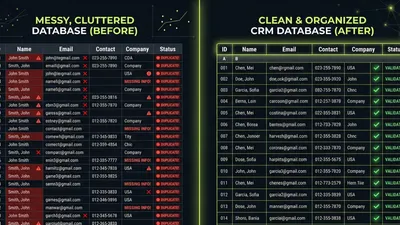
Low adoption creates bad data. Bad data makes the CRM less useful. Less usefulness reduces adoption further. It’s a death spiral that ends with an expensive tool nobody trusts.
According to Clari research, 47% of enterprises state they can’t rely on their CRM data to provide a single source of truth. That’s nearly half of all CRM implementations producing data nobody believes.
Wasted Investment
CRM software isn’t cheap. Add implementation costs, training time, and ongoing subscription fees, and you’ve made a significant investment. Every day of low adoption is money wasted.
Not sure why adoption is stalling? Let’s diagnose the problem together →
Strategy 1: Make It Easier
The single most effective adoption strategy is reducing friction. Every click you eliminate, every field you remove, every shortcut you create—these compound into dramatically better usage.
Simplify Data Entry
Audit your required fields. Do you really need all of them? Every required field is a barrier. Keep only what’s essential for your sales process.
Use dropdowns instead of text fields. Standardized options are faster to enter and create cleaner data.
Enable auto-population. Connect email, calendar, and phone systems so activities log automatically. The less manual entry required, the better.
Mobile optimization. If your reps are in the field, they need a CRM that works on their phone. Desktop-only systems guarantee low adoption from mobile teams.
Reduce Clicks
Map the most common workflows and count the clicks required. Then systematically reduce them:
- Set smart defaults that match your most common scenarios
- Create saved views for frequent report types
- Build quick-action buttons for common tasks
- Remove features and tabs your team doesn’t use
Integrate Everything
Every tool that doesn’t sync to your CRM creates double-entry. Prioritize integrations with:
- Email (automatic logging)
- Calendar (meeting syncing)
- Phone system (call logging)
- LinkedIn (contact enrichment)
- Document signing (deal stage updates)
The goal: reps should be able to work in their preferred tools while CRM data updates automatically.
Strategy 2: Show Personal Value
Adoption improves dramatically when reps see the CRM helping them sell—not just helping management monitor.
Highlight Rep-Focused Features
Train on features that directly help reps:
Email templates and sequences — Save time on repetitive outreach
Meeting scheduling links — Eliminate the back-and-forth of booking calls
Contact insights — Know a prospect’s history before the call
Task reminders — Never forget a follow-up
Mobile access — Update deals between meetings
Pipeline views — See exactly where every deal stands
Share Success Stories
Find reps who’ve benefited from CRM usage and have them share their experience. Peer advocacy is more persuasive than management mandates.
“I closed three deals last month that I would have forgotten about without my task reminders.”
“I used to spend Sunday nights updating my spreadsheet. Now it’s automatic.”
“When Sarah went on leave, I picked up her deals with full context. That never would have worked before.”
Connect CRM to Commission
If reps can track their progress toward quota, forecast their commission, and see exactly what they need to close—they’ll engage with the system. Make the CRM their scoreboard, not just management’s.
Strategy 3: Lead by Example
Nothing kills adoption faster than managers who don’t use the system themselves.
Managers Must Model Behavior
If you run pipeline meetings from spreadsheets, reps learn that the CRM doesn’t really matter. If you ask for information that’s already in the CRM, reps learn their data entry is pointless.
Use CRM data in meetings. Pull reports live. Reference deal records. Demonstrate that CRM is the source of truth.
Update your own records. Managers with CRM-tracked activities show that data entry isn’t beneath anyone.
Make decisions from CRM data. When forecasts, hiring plans, and territory assignments come from CRM reports, the system becomes essential.
Create Positive Accountability
Use CRM data to celebrate wins, not just catch failures.
“Sarah, you moved 12 deals forward this week—great progress.”
“Team, our average deal cycle dropped by 8 days. The new qualification process is working.”
“John, your follow-up consistency is excellent. Your close rate reflects it.”
When reps see CRM data used to recognize good work, they’ll engage with the system.
 Sales manager providing one-on-one CRM coaching to team member at workstation — Managers who model CRM behavior drive higher adoption rates
Strategy 4: Train Effectively
Generic CRM training rarely sticks. Effective training is role-specific, ongoing, and practical.
Role-Based Training
Reps, managers, and executives use CRM differently. Train each role on their specific workflows:
Sales reps: Daily tasks, contact management, pipeline updates, email integration
Sales managers: Team dashboards, coaching tools, forecast management, activity reports
Executives: High-level reporting, pipeline visibility, performance trends
Hands-On Practice
Lecture-style training doesn’t create habits. Build training around actual work:
- Import real contacts during training
- Create actual deals in the pipeline
- Send real emails through the system
- Run live reports on actual data
Ongoing Reinforcement
According to CRM.org research, 25% of businesses identify training and user adoption as the biggest CRM implementation challenge. One-time training isn’t enough.
Weekly tips: Share one feature or shortcut per week
Office hours: Dedicate time for questions and troubleshooting
Refresher sessions: Quarterly training on underutilized features
New hire onboarding: CRM training from day one, not as an afterthought
 Sales team engaged in hands-on CRM training session with laptops — Effective training is hands-on, role-specific, and ongoing
Strategy 5: Build the Right Habits
Adoption isn’t a one-time event—it’s daily behavior. Focus on building sustainable habits.
Start with One Workflow
Don’t try to adopt everything at once. Pick one workflow and make it habitual:
- Week 1-2: All new contacts go into CRM (not spreadsheets)
- Week 3-4: All meetings get logged
- Week 5-6: Pipeline updates happen within 24 hours
- Week 7-8: Email sequences replace manual follow-up
Each habit builds on the previous one. By month two, CRM usage is routine.
Create Triggers
Habits form faster when tied to existing behaviors:
- “After every call, update the contact record”
- “Before leaving for the day, move any changed deals”
- “Monday morning, review your task list”
- “Before pipeline meetings, verify your numbers”
Remove Alternatives
The harshest but most effective tactic: eliminate the workarounds.
If reps maintain shadow spreadsheets, those spreadsheets contain data CRM doesn’t. At some point, you must make CRM the only option—not one option among many.
This only works after you’ve addressed the legitimate concerns. Force adoption before fixing usability, and you’ll get compliance without commitment.
Want help building an adoption plan for your team? Schedule a CRM consultation →
 Confident sales professional efficiently using CRM on laptop in modern office — When reps see personal value in the CRM, adoption becomes natural
Measuring Adoption Progress
Track these metrics to gauge whether adoption is improving:
Activity Metrics
| Metric | What It Measures | Target |
|---|---|---|
| Daily active users | Who’s logging in | 100% of active reps |
| Activities logged per rep | Data entry behavior | Match expected activity |
| Pipeline updates | Deal management discipline | Within 24 hours of change |
| New contacts created | Lead capture in CRM | All new contacts |
Quality Metrics
| Metric | What It Measures | Target |
|---|---|---|
| Field completion rate | Data quality | 90%+ on critical fields |
| Duplicate rate | Data entry consistency | Under 1% |
| Stale deal percentage | Pipeline hygiene | Under 10% |
Outcome Metrics
| Metric | What It Measures | Target |
|---|---|---|
| Forecast accuracy | Data reliability | Within 10% of actual |
| Rep quota attainment | CRM effectiveness | Correlate with usage |
| Average deal cycle | Process efficiency | Trending down |
Run a quarterly CRM audit to systematically review these metrics and identify adoption gaps.
Key Takeaways
- CRM resistance usually stems from legitimate concerns: time, surveillance fears, complexity, and lack of personal value
- The most effective adoption strategy is reducing friction—every click eliminated improves usage
- Reps adopt faster when they see personal benefit, not just management benefit
- Managers must model the behavior they expect from their teams
- Training should be role-specific, hands-on, and ongoing—not a one-time event
- Build habits one workflow at a time; don’t try to adopt everything at once
What to Do Next
Pick one strategy from this guide and implement it this week:
-
If adoption is terrible: Start with Strategy 1 (Make It Easier). Audit required fields and eliminate unnecessary friction.
-
If reps see no value: Focus on Strategy 2. Train on rep-focused features and share success stories.
-
If managers aren’t engaged: Begin with Strategy 3. Model the behavior you expect.
-
If training was weak: Implement Strategy 4. Create role-based, hands-on training sessions.
-
If adoption is inconsistent: Use Strategy 5. Build habits one workflow at a time.
If you’ve tried these approaches and still struggle with adoption, the problem might be deeper—wrong CRM for your process, fundamental usability issues, or cultural resistance that needs outside help to overcome.
We’ve helped dozens of teams turn CRM skeptics into daily users. Book a consultation to discuss your specific situation and get a customized adoption plan.
Low adoption often starts with poor setup. A CRM audit reveals the adoption barriers your team won’t tell you about—and exactly how to fix them.
Matt Adams
Matt Adams is the Founder of MapMatix, an Australian living in Idaho who's passionate about all things automation and AI. He helps businesses streamline their operations through smarter CRM implementations and workflow automation.