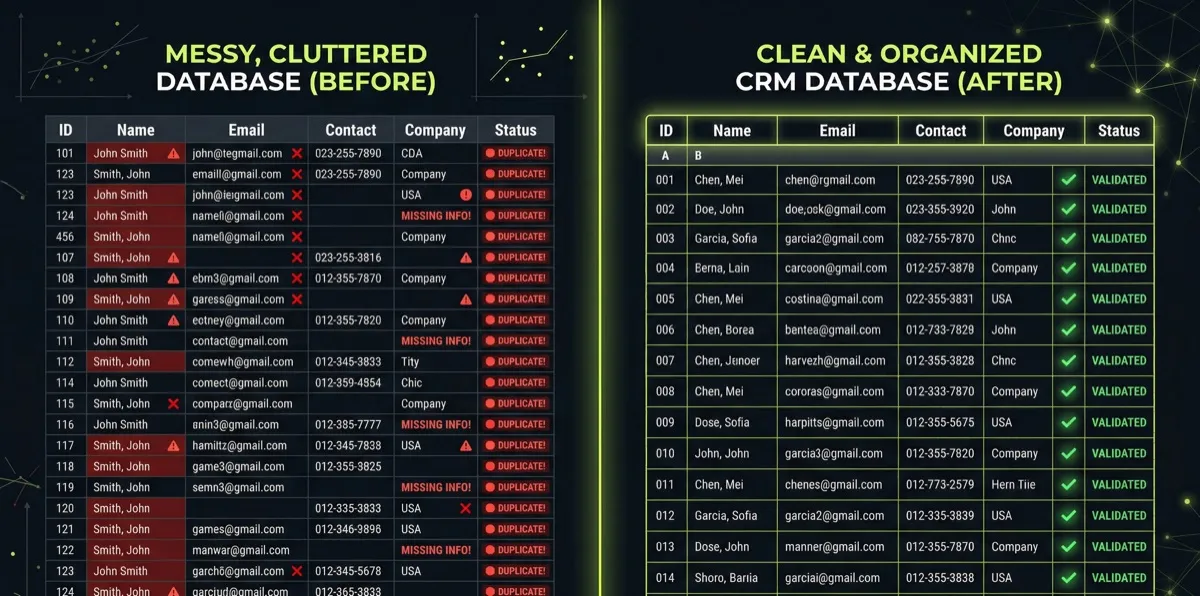
Your CRM is only as valuable as the data inside it. And right now, that data is probably a mess.
According to Validity’s State of CRM Data Management report, more than half of CRM admins rate their database accuracy at less than 80 percent. That same research found that 44% of companies estimate they lose over 10% of annual revenue due to poor CRM data quality.
If you’ve noticed red flags signaling it’s time to switch CRMs, messy data is often the root cause. But here’s the good news: you don’t need a new CRM. You need a cleanup.
This guide gives you a practical, week-by-week plan to fix your messy CRM data in 30 days. No expensive consultants required—just focused effort and the right approach.
Drowning in bad data? Request a free CRM health check to see where you stand →
 Frustrated professional overwhelmed by messy disorganized CRM data — More than half of CRM admins rate their database accuracy at less than 80 percent
Why CRM Data Gets Messy (And Why It Matters)
Before you start cleaning, understand what you’re fighting against.
The Data Decay Problem
B2B contact data decays at approximately 2.1% per month—that’s 22.5% annually. People change jobs, companies get acquired, email addresses become invalid, and phone numbers change. Even if you entered perfect data last year, nearly a quarter of it is wrong today.
The decay accelerates in fast-moving industries. Tech companies, startups, and consulting firms can see their data spoil in months, not years.
The Duplicate Problem
Duplicates compound the mess. According to research from Plauti analyzing over 12 billion Salesforce records, API integrations like marketing tools, sales software, and web forms create an 80% duplicate rate for new records. Even data imports show a 19% duplicate rate.
Without proper duplicate detection, every form submission, every integration sync, and every manual entry risks creating another copy of the same contact.
The Real Cost
This isn’t just an annoyance—it’s a revenue problem.
Landbase research found that sales representatives waste approximately 500 hours annually—that’s 62 working days—validating and correcting contact information. That’s nearly 25% of their selling capacity lost to data problems.
And when reps make decisions based on bad data? They call wrong numbers, email bounced addresses, and follow up with contacts who left the company months ago. Each failed touch erodes trust and wastes opportunities.
Before You Start: Assess the Damage
Don’t clean blindly. First, understand what you’re dealing with.
Run These Diagnostic Reports
1. Duplicate count Pull a report of contacts or companies with matching email addresses, phone numbers, or names. Most CRMs have built-in duplicate detection—run it and note the count.
2. Empty field audit Check critical fields like email, phone, company, and job title. What percentage are blank? Focus on fields your team actually uses for outreach.
3. Activity recency When was each record last updated? Records untouched for 12+ months are likely stale. Records with no activity ever may be junk.
4. Bounce and unsubscribe rates If you’re sending marketing emails, check your bounce rate. Anything above 2% signals data quality issues. Above 5% is a serious problem.
Set Your Baseline
Document these numbers before you start cleaning:
- Total records
- Duplicate count
- Percentage of empty critical fields
- Records with no activity (12+ months)
- Email bounce rate
You’ll compare against these metrics to measure progress. Without a baseline, you can’t prove the cleanup worked.
 Professional methodically organizing and cleaning CRM records on computer — A focused 30-day cleanup can restore trust in your CRM data
Week 1: Tackle Duplicates
Duplicates are the highest-impact problem to solve first. They cause immediate confusion and compound every other data issue.
Step 1: Choose Your Merge Strategy
Before merging anything, decide how you’ll handle conflicts. When two records have different data (different phone numbers, different job titles), which value wins?
Options:
- Most recent wins — Newer data is usually more accurate
- Most complete wins — The record with more filled fields becomes the master
- Manual review — You decide case by case (time-consuming but accurate)
For most businesses, “most recent wins” with exceptions for clearly wrong data works well.
Step 2: Start with Exact Matches
Begin with records that are clearly duplicates—same email address, same everything. These are safe to merge automatically.
In HubSpot: Navigate to Contacts > Actions > Manage Duplicates. Review and merge exact matches.
In Salesforce: Use duplicate rules and matching rules, or a tool like Duplicate Check.
In Pipedrive: Go to Data > Cleanup > Duplicates and merge matching records.
Step 3: Handle Fuzzy Matches
Next, tackle records that look like duplicates but aren’t exact. “John Smith” at “ABC Company” and “J. Smith” at “ABC Corp” are probably the same person.
These require manual review. Set a daily quota—20-30 records per day—to avoid burnout while making steady progress.
Week 1 Target
By end of week one, aim to reduce your duplicate count by 50% or more. The exact number depends on how bad your starting point was.
Finding more duplicates than you can handle? Let’s discuss a cleanup strategy →
Week 2: Fix Missing and Invalid Data
With duplicates handled, turn to incomplete records.
Prioritize by Impact
Not all empty fields matter equally. Focus on fields that affect your actual sales process:
Critical fields (fix first):
- Email address
- Phone number (if you make calls)
- Company name
- Contact owner
Important fields (fix second):
- Job title/role
- Industry
- Lead source
- Last activity date
Nice-to-have fields (fix if time permits):
- LinkedIn URL
- Physical address
- Company size
Data Enrichment Options
You have three options for filling gaps:
Manual research Your team looks up missing information. Time-consuming but accurate. Best for high-value accounts.
Data enrichment tools Services like ZoomInfo, Clearbit, or Apollo can automatically fill in company and contact data. Cost varies, but high-accuracy providers deliver 66% higher conversion rates than those using standard databases.
Ask the contact Run an email campaign asking contacts to update their information. Low cost, but low response rates (expect 5-15%).
Validate Email Addresses
Invalid emails are worse than missing emails—they hurt your sender reputation and waste outreach effort.
Use an email verification service (NeverBounce, ZeroBounce, Hunter) to check your database. Remove or flag addresses that bounce.
Week 2 Target
By end of week two, aim for 90%+ completion on critical fields and verified email addresses for active contacts.
Week 3: Standardize and Organize
Clean data isn’t just complete data—it’s consistent data. “United States,” “US,” “USA,” and “U.S.A.” are all the same country, but your reports will treat them as four different values.
Standardize Common Fields
Country and state names Pick a format (full names or abbreviations) and apply it consistently. Most CRMs support dropdown fields that force standardization—use them.
Industry classifications If your team entered industries as free text, you probably have dozens of variations. Consolidate to a standard list.
Lead sources “Website,” “Web form,” “Organic,” and “Homepage” might all mean the same thing. Standardize to clear, distinct values.
Company names “IBM,” “I.B.M.,” “International Business Machines” should all be one value. This is tedious but essential for accurate company-level reporting.
Build Validation Rules
Prevention beats cleanup. Set up validation to stop bad data at the source:
- Required fields on forms and imports
- Dropdown menus instead of free text where possible
- Email format validation
- Phone number format standardization
Create Naming Conventions
Document how your team should enter data going forward:
| Field | Convention | Example |
|---|---|---|
| Company Name | Legal name, no abbreviations | ”International Business Machines” not “IBM” |
| Phone | Country code + number, no formatting | ”+15551234567” |
| Job Title | Standardized list | ”VP of Sales” not “Vice President, Sales” |
Week 3 Target
By end of week three, your critical fields should follow consistent formatting, and you should have documentation for ongoing data entry standards.
Week 4: Segment and Maintain
The final week shifts from cleanup to sustainability.
Segment Your Database
Now that your data is clean, organize it for use:
Active contacts — Engaged in the last 6 months. Your primary outreach list.
Stale contacts — No engagement in 6-12 months. Worth a re-engagement campaign before removing.
Inactive contacts — No engagement in 12+ months. Archive or delete depending on your industry and retention requirements.
Unsubscribed/bounced — Keep for compliance but exclude from all outreach.
Set Up Ongoing Maintenance
A one-time cleanup without maintenance guarantees you’ll be back here in a year. Build these habits:
Daily: Reps verify contact info on every call or meeting. If something’s wrong, they fix it immediately.
 Team member verifying and validating contact information during phone call — Verify contact info on every call—if something is wrong, fix it immediately
Weekly: Run a quick duplicate check on new records from the past week. Catch them before they multiply.
Monthly: Review bounce rates and unsubscribes. Remove bad addresses promptly.
Quarterly: Full data audit. Use a CRM audit checklist to systematically review data quality, pipeline health, and adoption metrics.
Archive vs. Delete
Don’t delete records you might need for compliance or historical reporting. Instead, archive them:
- Move to a “dormant” list or segment
- Exclude from active marketing and sales views
- Keep for reference if needed
Only hard-delete records that are clearly junk—test submissions, spam entries, or irreparable duplicates.
Week 4 Target
By end of week four, your database should be segmented into actionable lists, and you should have documented processes for ongoing maintenance.
Want expert help building sustainable data practices? Schedule a CRM consultation →
 Organized minimalist workspace representing clean well-maintained CRM data — Clean, organized data means better business decisions and higher efficiency
Measuring Success
How do you know the cleanup worked? Compare your new metrics to the baseline you set at the start.
Key Metrics to Track
| Metric | Before | After | Target |
|---|---|---|---|
| Duplicate count | [Your baseline] | [Post-cleanup] | 75%+ reduction |
| Critical field completion | [Your baseline] | [Post-cleanup] | 90%+ |
| Email bounce rate | [Your baseline] | [Post-cleanup] | Under 2% |
| Stale records (12+ months) | [Your baseline] | [Post-cleanup] | Segmented/archived |
Business Impact Metrics
Beyond data quality, look for business improvements:
- Email deliverability — Should improve as bounces decrease
- Call connect rates — Should improve with verified phone numbers
- Report accuracy — Should increase as duplicates are eliminated
- Team trust in CRM — Survey your team; do they trust the data now?
If your team still avoids using the CRM, data quality might not be the only problem—see our guide on getting your team to actually use the CRM. But clean data removes one major excuse for working outside the system.
Key Takeaways
- CRM data decays at 22.5% annually—even perfect data goes bad without maintenance
- Duplicates are the highest-impact problem; tackle them first
- Focus on critical fields that affect your actual sales process
- Standardization prevents future messes; build validation rules and naming conventions
- One-time cleanup without ongoing maintenance guarantees you’ll repeat this process
- Measure before and after to prove the cleanup’s value
What to Do Next
Don’t try to fix everything at once. Follow this 30-day plan:
- This week: Run diagnostic reports and set your baseline
- Week 1: Merge duplicates, starting with exact matches
- Week 2: Fill missing critical fields and validate emails
- Week 3: Standardize formatting and build prevention rules
- Week 4: Segment your database and establish maintenance routines
If your data problems are severe—more duplicates than clean records, years of accumulated junk, or multiple disconnected systems—a guided cleanup may be faster and more effective than going it alone.
We’ve helped dozens of businesses restore their CRM data from chaos to clarity. Book a free consultation to discuss your specific situation and get a customized cleanup plan.
Not sure where to start? A comprehensive CRM audit identifies exactly which data issues are costing you money—so you can prioritize what to fix first.
Matt Adams
Matt Adams is the Founder of MapMatix, an Australian living in Idaho who's passionate about all things automation and AI. He helps businesses streamline their operations through smarter CRM implementations and workflow automation.