You’ve chosen your CRM. Now comes the hard part—making it work.
According to Merkle Group research (widely cited in the industry), 63% of CRM initiatives fail. Not because the software is bad, but because implementation is rushed, training is skipped, and data quality is ignored. The difference between a CRM that transforms your business and one that becomes expensive shelfware isn’t features—it’s execution.
This guide walks you through CRM implementation step by step. Whether you’re implementing HubSpot, Salesforce, Pipedrive, or any other platform, these principles apply. Follow them, and you’ll join the minority of businesses that actually get ROI from their CRM investment.
If you haven’t selected your CRM yet, start with our guide on how to choose the right CRM for your business first.
Want expert help with your implementation? Schedule a free consultation →
 Business team collaborating on CRM implementation strategy in meeting room — Successful implementations start with thorough planning and clear goals
Why Implementation Matters More Than Selection
Most businesses spend months choosing a CRM and days implementing it. That’s backwards.
The CRM you choose matters less than how you implement it. A perfectly chosen CRM implemented poorly will fail. A “good enough” CRM implemented properly will succeed.
The Cost of Poor Implementation
When implementation goes wrong:
- User adoption collapses — According to CRM.org, 25% of businesses identify training and user adoption as their biggest CRM challenge
- Data becomes unreliable — Bad data migrated poorly makes the new system worse than what you had before
- Integrations break — Half-configured connections create more work, not less
- Teams revolt — Frustrated users find workarounds, defeating the purpose of the system
- Investment is wasted — You paid for software that sits unused while deals slip through cracks
What Successful Implementation Looks Like
When implementation goes right:
- Users adopt the system within 30-60 days
- Data is clean, organized, and trustworthy
- Integrations work reliably in the background
- Reports reflect reality and drive decisions
- The CRM becomes how work gets done—not an extra task
According to Nutshell research, most businesses see positive ROI within 12 months of CRM implementation. Initial benefits like improved data organization and automated workflows often appear within 90 days. But that timeline assumes implementation was done properly.
Phase 1: Planning and Preparation
Don’t touch the software until you’ve done this phase. Rushing here causes problems that cascade through everything else.
Define Success Criteria
Before you start, define what success looks like. Be specific:
Bad goals:
- “Improve sales efficiency”
- “Get better visibility into the pipeline”
- “Organize our customer data”
Good goals:
- “Reduce lead response time from 24 hours to under 2 hours”
- “Increase pipeline accuracy so forecasts are within 10% of actuals”
- “Eliminate duplicate contacts and maintain less than 5% duplicate rate”
Write down 3-5 specific, measurable goals. These become your implementation scorecard.
Assign Roles and Responsibilities
Every successful implementation needs clear ownership:
Executive Sponsor Senior leader who champions the initiative, removes blockers, and holds teams accountable. Without executive support, implementations stall when competing priorities arise.
Project Owner Day-to-day driver of the implementation. Coordinates between teams, tracks progress, and makes decisions. This person needs dedicated time—not “in addition to their regular job.”
CRM Administrator Technical owner of the system. Handles configuration, user management, and ongoing maintenance. For simpler CRMs, this might be the project owner. For complex systems like Salesforce, you may need a dedicated resource.
Department Champions Representatives from each team that will use the CRM. They provide input on workflows, test configurations, and help drive adoption within their teams.
Document Current State
Before building something new, understand what exists:
- Where does customer data currently live? Spreadsheets, email, another CRM, paper files?
- What’s your current sales process? Map every step from lead to close
- What tools are you using? List everything that might need to integrate
- What’s working? Don’t break things that already work well
- What’s broken? Prioritize solving actual pain points
Create Your Implementation Plan
Build a realistic timeline with clear milestones:
| Week | Phase | Key Activities |
|---|---|---|
| 1-2 | Planning | Define goals, assign roles, document current state |
| 2-3 | Data Prep | Audit data, clean duplicates, prepare for migration |
| 3-4 | Configuration | Set up pipeline, custom fields, user permissions |
| 4-5 | Integration | Connect critical tools, verify data flows |
| 5-6 | Testing | Test all workflows, fix issues |
| 6-7 | Training | Train users, create documentation |
| 7-8 | Launch | Go live with support ready |
| 8-12 | Optimization | Refine based on feedback, add complexity gradually |
Adjust based on your CRM complexity and team size. More on timelines below.
Phase 2: Data Preparation and Migration
Data migration is where most implementations go wrong. According to SyncMatters research, 55% of CRM migration projects fail to deliver on their promises.
The solution? Invest heavily in this phase. See our guide on how to fix messy CRM data in 30 days.
Audit Your Existing Data
Before moving anything, understand what you’re working with:
Data inventory:
- How many contacts do you have?
- How many companies/accounts?
- What associated data exists (deals, activities, notes)?
- Where is data stored (which systems, which spreadsheets)?
Data quality assessment:
- What percentage of records have complete information?
- How many duplicates exist?
- How old is the data? When was it last verified?
- What format inconsistencies exist (phone numbers, addresses, etc.)?
Research shows that over 70% of CRM records become inaccurate within a year due to data decay. If you haven’t cleaned your data recently, expect significant work.
Clean Before You Migrate
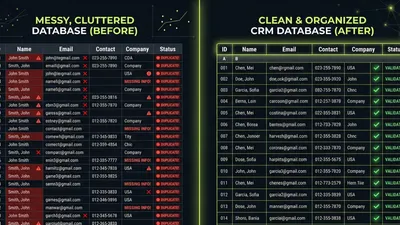
Never migrate dirty data. You’ll just transfer problems to a new system—often making them worse.
Cleaning priorities:
- Remove duplicates — Merge records where the same contact appears multiple times
- Standardize formats — Phone numbers, addresses, company names should be consistent
- Fill critical gaps — Identify required fields and fill missing data where possible
- Archive dead data — Contacts that bounced, companies out of business, deals from 2015
- Verify accuracy — Spot-check a sample to ensure data is still valid
The 1-10-100 rule: According to data quality experts, it costs $1 to verify a record as it’s entered, $10 to cleanse and dedupe it later, and $100 if nothing is done as mistakes compound.
Plan Your Migration
Decide what to migrate: Not everything needs to move. Consider migrating:
- Active contacts and companies (interacted with in last 2 years)
- Open and recent deals
- Essential historical data for context
Consider leaving behind:
- Ancient records with no recent activity
- Known bad data
- Redundant or outdated custom fields
Choose your migration method:
| Method | Best For | Risk Level |
|---|---|---|
| Native import | Simple CRMs, small datasets | Low |
| Migration tools | CRM-to-CRM moves, medium complexity | Medium |
| ETL process | Complex data, large volumes, custom transformations | Medium-High |
| Custom development | Highly customized source systems | High |
Execute Migration
- Export from source system — Get everything out in a clean format
- Transform data — Map fields, standardize formats, apply business rules
- Test import — Load into a sandbox/test environment first
- Verify — Check that data looks right, relationships are preserved
- Production import — Load into live system
- Validate — Confirm record counts, spot-check quality
Pro tip: Always keep a backup of your original data. If something goes wrong, you need to be able to start over.
 Professional carefully reviewing and preparing data for CRM migration — Never migrate dirty data—clean first, migrate second
Phase 3: Configuration and Customization
With clean data ready, now configure the CRM to match how you actually work.
Set Up Your Pipeline
Your pipeline stages should mirror your real sales process—not a generic template.
Good pipeline stages:
- Reflect actual steps in YOUR process
- Have clear entry and exit criteria
- Move consistently from left to right
- Number between 5-8 stages (not too few, not too many)
Example pipeline for a service business:
- New Lead — Just came in, not yet contacted
- Contacted — Initial outreach made
- Discovery — Needs assessment conversation scheduled or completed
- Proposal Sent — Quote/proposal delivered
- Negotiation — Discussing terms, handling objections
- Closed Won — Deal signed
- Closed Lost — Didn’t win (track why)
Configure Custom Fields
Add fields that capture information essential to your business. But resist the urge to track everything.
Essential custom fields:
- Lead source (where did this contact come from?)
- Industry/vertical (if you segment by industry)
- Company size (if relevant to your sales process)
- Product interest (if you sell multiple products)
Avoid:
- Fields “just in case” you need them later
- Redundant fields that duplicate standard fields
- Free-text fields where dropdowns would be better
- Required fields that slow down data entry
Research shows that 30-40% of custom fields are rarely used in most organizations. Start minimal and add fields when you have clear use cases.
Set Up User Permissions
Configure who can see and do what:
- Admin access — Full control, should be limited
- Manager access — View all data, manage team
- User access — Own records plus shared data
- Read-only access — For stakeholders who need visibility but don’t enter data
Get permissions right from the start. Fixing them later means changing habits.
Phase 4: Integration Setup
Your CRM shouldn’t exist in isolation. It needs to connect with the tools your team already uses.
Priority Integrations
Focus on integrations that eliminate manual work or prevent data silos:
Tier 1 — Must have for launch:
- Email (Gmail/Outlook) — Log communications automatically
- Calendar — Schedule meetings without switching apps
- Website forms — Capture leads directly into CRM
Tier 2 — Add within 30 days:
- Marketing automation — Sync leads and track engagement
- Communication tools (Slack/Teams) — Get CRM notifications where you work
- Accounting (QuickBooks/Xero) — Connect deals to invoices
Tier 3 — Add as needed:
- Phone system — Log calls automatically
- Support desk — See service tickets in contact records
- Proposal software — Track document engagement
Integration Best Practices
- Test thoroughly — Verify data flows correctly before relying on it
- Monitor for failures — Integrations break; know when they do
- Document what’s connected — Future you will thank present you
- Avoid duplicate data entry — If it’s in one system, it shouldn’t need manual entry elsewhere
According to Freshworks research, 19% of companies cite lack of integration as a major CRM challenge. Investing in integrations early prevents this from becoming your problem. For help choosing integration tools, see our Zapier vs Make.com comparison.
Phase 5: Testing
Never launch without testing. What works in theory often breaks in practice.
What to Test
Data accuracy:
- Did all records migrate correctly?
- Are relationships preserved (contacts linked to companies, deals to contacts)?
- Do numbers match between old and new systems?
Workflows:
- Create a test lead and move it through the entire pipeline
- Verify automations trigger correctly
- Confirm notifications reach the right people
Integrations:
- Send a test email—does it log?
- Submit a form—does the lead appear?
- Complete an action—does the integration fire?
Reports:
- Do dashboards show accurate data?
- Can users run the reports they need?
- Are numbers logical (no negative values, impossible totals)?
Permissions:
- Can users access what they should?
- Are they blocked from what they shouldn’t see?
- Do permission changes take effect immediately?
Testing Process
- Admin testing — Project owner/admin tests core functionality
- Power user testing — Champions from each team test their workflows
- UAT (User Acceptance Testing) — Representative users test real scenarios
- Fix issues — Address everything found before launch
- Retest — Verify fixes work and didn’t break anything else
Phase 6: Training and Rollout
The best-configured CRM fails if users don’t know how to use it—or don’t want to.
Training Principles
According to CRM.org research, 42% of businesses cite lack of training or CRM experts as their biggest barrier. Don’t be one of them.
Effective training is:
- Role-specific — Sales reps, managers, and admins need different training
- Hands-on — Watching demos isn’t learning; doing is
- Ongoing — Not a one-time event but a continuous process
- Bite-sized — Short sessions are better than marathon training days
- Contextual — Show how the CRM helps with actual daily tasks
Training Schedule
Pre-launch (Week before go-live):
- Overview session for all users (30-60 minutes)
- Role-specific deep dives (60-90 minutes per role)
- Hands-on practice with test data
Launch week:
- Daily office hours for questions
- Quick-reference guides available
- Champions available to help teammates
Post-launch (First 30 days):
- Weekly Q&A sessions
- Advanced feature training
- Address common struggles as they emerge
Driving Adoption
Training teaches skills. Adoption requires motivation. See our guide on getting your team to actually use the CRM.
What drives adoption:
- Executive leadership uses the CRM visibly
- CRM data is used in meetings and decisions
- Quick wins are celebrated
- Pain points are addressed promptly
- Good behavior is recognized
 Team members engaged in hands-on CRM training session with laptops — 42% of businesses cite lack of training as their biggest CRM challenge
What kills adoption:
- Leadership asking for data that’s not in the CRM
- Punishing mistakes instead of supporting learning
- Requiring CRM use while allowing workarounds
- Ignoring feedback from users
- Making the CRM feel like surveillance
Launch Approaches
Big bang launch: Everyone starts using the new CRM on the same day. Old systems are turned off.
- Pros: Clean break, no maintaining parallel systems
- Cons: Higher risk, more pressure
- Best for: Smaller teams, simpler CRMs
Phased rollout: Roll out to one team or department at a time.
- Pros: Learn and adjust before wider rollout
- Cons: Longer timeline, maintaining multiple systems
- Best for: Larger organizations, complex implementations
Pilot launch: Start with a small group, prove value, then expand.
- Pros: Low risk, build internal champions
- Cons: Extended timeline, pilot team may not represent all needs
- Best for: Organizations with change resistance
Phase 7: Post-Launch Optimization
Launch isn’t the finish line—it’s the starting line.
First 30 Days
Focus on:
- Answering questions quickly
- Fixing bugs and issues promptly
- Ensuring basic adoption (people logging in, entering data)
- Collecting feedback systematically
Metrics to track:
- Daily/weekly active users
- Records created/updated
- Common errors or complaints
Days 31-90
Focus on:
- Addressing feedback themes
- Adding automations that save time
- Refining reports based on actual needs
- Building advanced training
Metrics to track:
- Data quality scores
- Time spent on manual tasks
- User satisfaction
Ongoing Optimization
CRM optimization never ends. Schedule quarterly reviews using our CRM audit checklist to:
- Audit data quality
- Review and refine automations
- Assess which features are used vs. ignored
- Gather user feedback
- Plan improvements
Want help optimizing your CRM? Book a CRM audit →
 Team celebrating successful CRM implementation project completion — Most businesses see positive ROI within 12 months of proper CRM implementation
Implementation Timelines by CRM Complexity
Not all CRMs take the same time to implement. Here’s what to expect:
Simple CRMs (Pipedrive, HubSpot Free/Starter)
Timeline: 2-4 weeks
| Phase | Duration |
|---|---|
| Planning | 2-3 days |
| Data prep | 3-5 days |
| Configuration | 2-3 days |
| Integration | 2-3 days |
| Testing | 2-3 days |
| Training | 2-3 days |
| Launch | 1 day |
Characteristics:
- Small team (under 20 users)
- Simple sales process
- Few integrations needed
- Limited customization required
Moderate CRMs (HubSpot Professional, Zoho, Freshsales)
Timeline: 4-8 weeks
| Phase | Duration |
|---|---|
| Planning | 1 week |
| Data prep | 1-2 weeks |
| Configuration | 1 week |
| Integration | 1 week |
| Testing | 1 week |
| Training | 1 week |
| Launch + optimization | Ongoing |
Characteristics:
- Mid-sized team (20-100 users)
- Multiple pipelines or products
- Several integrations needed
- Moderate customization
Complex CRMs (Salesforce, HubSpot Enterprise)
Timeline: 2-6 months
| Phase | Duration |
|---|---|
| Planning | 2-4 weeks |
| Data prep | 2-4 weeks |
| Configuration | 3-6 weeks |
| Integration | 2-4 weeks |
| Testing | 2-3 weeks |
| Training | 2-4 weeks |
| Launch + optimization | Ongoing |
Characteristics:
- Large team (100+ users)
- Complex sales processes
- Many integrations, some custom
- Extensive customization
- Dedicated admin resources
Common Implementation Mistakes
Learn from others’ failures:
Mistake #1: Rushing to Launch
Pressure to “go live” causes teams to skip data cleaning, cut training short, and launch with known issues. The result? More work later and damaged user trust.
Fix: Build realistic timelines with buffer. Rushing saves days but costs months.
Mistake #2: Migrating Dirty Data
“We’ll clean it up after migration” never happens. Dirty data in a new system is still dirty data—now in two places.
Fix: Clean first, migrate second. Always.
Mistake #3: Over-Customizing
Adding every field, automation, and feature from day one creates complexity users can’t handle.
Fix: Start simple. Add complexity when you’ve mastered basics.
Mistake #4: Skipping Training
“It’s intuitive—they’ll figure it out” is a lie. Even simple CRMs require training for consistent use.
Fix: Budget time and resources for real training. Plan for ongoing support.
Mistake #5: No Executive Sponsorship
When leadership doesn’t champion the CRM, it becomes optional. Optional systems fail.
Fix: Get executives visibly using and supporting the CRM from day one.
Mistake #6: Ignoring Feedback
Users tell you what’s broken. Ignoring them guarantees they’ll stop using the system.
Fix: Create feedback channels. Respond to issues quickly. Communicate what you’re fixing.
Mistake #7: Treating Launch as the End
Implementation is a project with an end date. CRM success requires ongoing attention.
Fix: Plan for post-launch optimization. Schedule regular reviews.
Measuring Implementation Success
How do you know if your implementation worked? Measure these metrics at 30, 60, and 90 days post-launch:
Adoption Metrics
| Metric | Target | How to Measure |
|---|---|---|
| Daily active users | 80%+ of licensed users | Login reports |
| Data entry compliance | 90%+ of required fields filled | Data quality reports |
| Activity logging | 80%+ of activities logged in CRM | Activity reports |
Data Quality Metrics
| Metric | Target | How to Measure |
|---|---|---|
| Duplicate rate | Under 5% | Duplicate detection tools |
| Record completeness | 85%+ of critical fields | Field completion reports |
| Data freshness | 90% of records touched in 90 days | Last modified reports |
Business Impact Metrics
| Metric | Target | How to Measure |
|---|---|---|
| Lead response time | Decreased | Response time reports |
| Pipeline visibility | Improved (qualitative) | Manager feedback |
| Forecast accuracy | Within 15% | Forecast vs. actual comparison |
| Sales cycle length | Stable or decreased | Deal velocity reports |
User Satisfaction
Survey users at 30 and 90 days:
- How easy is the CRM to use? (1-10)
- Does the CRM help you do your job? (1-10)
- What’s the most frustrating thing about the CRM?
- What would you improve?
Key Takeaways
- Implementation matters more than selection—a well-implemented average CRM beats a poorly-implemented great one
- Clean data before migration—migrating garbage creates garbage in a new location
- Start simple—add complexity after users master basics
- Training isn’t optional—42% of businesses cite lack of training or CRM expertise as their biggest barrier
- Executive sponsorship is critical—without visible leadership support, CRM becomes optional
- Launch is the beginning, not the end—plan for ongoing optimization
- Measure what matters—track adoption, data quality, and business impact at 30/60/90 days
What to Do Next
Implementation success comes from preparation, patience, and ongoing attention. Whether you’re starting fresh or fixing a previous implementation, the principles remain the same.
Your next steps:
- Assess where you are — Have you completed each phase properly?
- Identify gaps — Where did you rush or skip steps?
- Build your plan — Create a realistic timeline with clear ownership
- Start with data — Clean your data before anything else
- Invest in training — Budget real time for real training
Need help with your implementation? We’ve guided hundreds of businesses through CRM implementations—from simple setups to complex enterprise rollouts. Whether you need a second opinion or full implementation support, we’re here to help.
Matt Adams
Matt Adams is the Founder of MapMatix, an Australian living in Idaho who's passionate about all things automation and AI. He helps businesses streamline their operations through smarter CRM implementations and workflow automation.